WordPress only, 10+ years
WordPress Maintenance Services: Updates, Backups, 24/7 Cover
Check any WordPress site free, then hand it to us. Our WordPress maintenance services patch core, plugins and themes on a staging copy, harden the install, take off-site backups, watch uptime every minute and repair breakages the same day — one team, one platform, 100+ sites under management and 10+ years doing only this.
Check your WordPress site free
Enter a site address and get the same first-pass check we run before quoting. Takes about ten seconds.
Reads only what any visitor can see — no login, no access needed. We keep the address, your email and what the check found for 1 year, then delete it. How we handle it.
- Updates tested on a staging copy before they touch the live site
- Off-site backups you can restore yourself in one click
- Uptime checked every minute, engineer paged on the second failed check
- 500+ hacked sites recovered — malware cleanup included from $79/month
What is covered, month to month
| Task | How often | Starter | Professional | Business |
|---|---|---|---|---|
| WordPress core, plugin and theme updates | Weekly | Yes | Yes | Yes |
| Updates tested on staging first | Weekly | – | Yes | Yes |
| Off-site backup | Daily | Daily | Twice daily | Hourly |
| Restore from backup | On request | Yes | Yes | Yes |
| Uptime check | Every 5 min | Every 5 min | Every minute | Every minute |
| Malware scan | Daily | Daily | Daily | Daily |
| Malware removal | On detection | Charged | Included | Included |
| Hack recovery | On detection | Charged | Once a year | Unlimited |
| Performance tuning | Monthly | – | Yes | Yes |
| Uptime and work report | Monthly | Yes | Yes | Yes |
| Support response, business hours | – | 48 hours | 24 hours | 8 hours |
| Outage or compromise response | Any hour | Any hour | Any hour | Any hour |
What is a WordPress maintenance service?
A WordPress maintenance service is the ongoing technical work that keeps a live site secure, fast and online: core, plugin and theme updates applied and tested, security hardening and daily scanning, off-site backups with tested restores, uptime monitoring, performance work, and repair when something breaks. It is bought as a monthly retainer rather than as one-off fixes, because the work recurs whether or not anybody schedules it.
The terms move around and mean the same thing. WordPress support and maintenance, WordPress website maintenance services, a WordPress maintenance company, WordPress support & maintenance — all of it describes one arrangement: somebody owns the upkeep of a site that is already live.
Every provider prints roughly that list, which is why the list is not how you choose one. The criteria that actually separate them — a stated response window, staging, restore-test dates, the tier where malware cleanup appears — are scored on how to compare maintenance providers.
Why a WordPress site needs maintaining at all
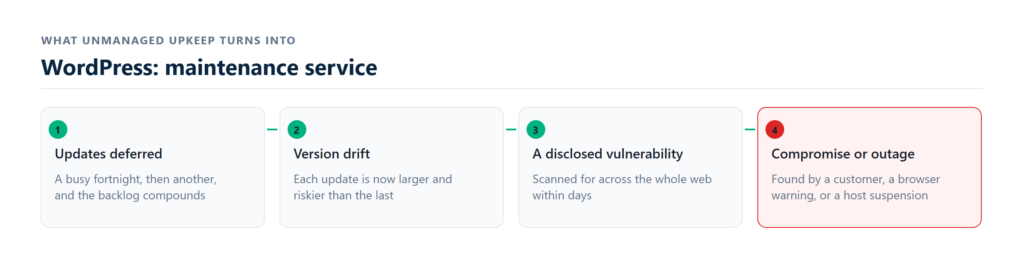
A WordPress site is not a finished object. Core ships a security release every few weeks, the average site runs 20–30 plugins on their own release schedules, and the combination is what breaks.
WordPress runs a little over 40% of the web, which makes it the most scanned platform there is — automated bots probe for known plugin vulnerabilities continuously, and they are not selecting targets, they are walking address ranges. The overwhelming majority of compromised sites we recover were not broken into through WordPress itself. They were running an outdated or abandoned plugin, or an administrator password reused from an unrelated breach.
Neither of those is fixed by anything on the site. Both are fixed by somebody applying patches on a schedule and closing the credential routes — which is the whole of what this service is. The individual measures, and what each one closes, are set out under WordPress security and hardening.
The table above is the entire scope, month to month. Nothing behind it gets billed separately except work outside maintenance: new features, redesigns and migrations are quoted before they start. Where each capability first appears, and what the three tiers cost, is on maintenance plans and pricing.
Why updates are the part everyone gets wrong
Automatic updates solve the wrong half of the problem. They close the security window quickly, which matters, and they apply changes to a live site with no test, which is how a site goes down at 2am on a Sunday with nobody watching.
- We update a staging copy first. Same PHP version, same data, same plugins.
- We check what actually earns money. Checkout, booking forms, contact forms, login. Not just that the homepage loads.
- We roll forward only when it passes. A plugin that breaks stays on the old version, and we tell you which one and why.
- The old version is kept. The last good backup is minutes old, not last night’s.
An update that has already taken a site down is a different job from preventing the next one. That runs through emergency WordPress support, which restores service first and works the cause afterwards.
What happens in the first week
Nothing is charged before you have seen the audit.
- Run the free check above, or send us the URL. You get the patch backlog, exposed version numbers, missing security headers and server response time.
- We take a full off-site backup before touching anything, and confirm we can restore it.
- Staging copy built, the update backlog cleared in batches, each batch tested.
- Hardening applied: login lockdown, XML-RPC off, user enumeration closed, file permissions corrected, headers set.
- Monitoring switched on. From then it is weekly work and a monthly report.
Plans that include this
- Starter$39/monthor $390 a year — two months freeBlogs, portfolios and brochure sites
- UpdatesMonthly
- BackupsWeekly, 30-day retention
- Uptime5-minute checks
- Malware removalNot included
- Most chosenProfessional$79/monthor $790 a year — two months freeSmall businesses and lead-generation sites
- UpdatesWeekly + PHP version management
- BackupsDaily, 60-day retention
- Uptime1-minute checks
- Malware removalIncluded
- Business$149/monthor $1490 a year — two months freeStores, membership sites, anywhere downtime costs money
- UpdatesWeekly, tested on staging first
- BackupsDaily, 90-day, multi-location
- Uptime1-minute + 2-hour restore
- Malware removalIncluded
Cover that does not sleep
- Monitored every minuteA check runs from three regions. Two consecutive failures page an engineer — it does not wait for you to notice.
- An outage is answered at any hourA site down or actively compromised gets a response around the clock, nights and weekends included. Questions, edits and planned work run in business hours inside your plan's window.
- Backups keep running while you sleepCopies land off-site, on separate infrastructure from the host, so a host failure cannot take both.
- You are told before you are askedIf we break something on update, we roll back and email you what happened. You should not learn it from a customer.
Cover matched to your sector
- Small businessOne site, no in-house technical person, and downtime that goes straight to the phone not ringing.
- AgenciesWhite-label cover you resell under your own brand, with your logo on the report and our name nowhere.
- HVAC and tradesSeasonal demand spikes. An outage in a heatwave costs a week of calls, not a week of traffic.
- HealthcareBooking forms, patient data and a compliance load that makes an unpatched plugin a legal problem.
- Real estateListing feeds and IDX plugins that break on update more than any other category we manage.
- Ecommerce and WooCommerceCheckout, tax, shipping and payment gateways tested after every update, not assumed.
Everything we handle
- Update managementCore, plugins and themes patched weekly, tested on a staging copy, rolled back if anything moves.
- Security and hardeningLogin lockdown, file permissions, XML-RPC off, user enumeration closed, headers set, scanned daily.
- Backups and restoreOff-site copies on separate infrastructure, restorable in one click, tested quarterly so you know they work.
- Speed optimisationCore Web Vitals worked against field data, not lab scores. Caching, images, database, render path.
- Uptime monitoringOne-minute checks from three regions, with an engineer paged rather than a dashboard nobody reads.
- Malware removal and hack repairCleanup, reinfection close-off, blacklist clearance. 500+ sites recovered.
- WooCommerce upkeepCheckout tested after every update, because a store that cannot take payment is not a maintenance issue, it is lost revenue.
- MigrationHost to host with no downtime and no lost mail, rankings carried across.
What clients say
They found malware two of our previous agencies had missed, cleaned it in an afternoon, and told us exactly how it got in.
Operations Director, professional services, 4 sitesThe staging step is the whole point. Three years and not one update has taken our booking form down.
Practice Manager, healthcareWe resell it to 31 clients under our own brand. The reports go out with our logo and our clients have never heard their name.
Agency Founder, digital agency
Questions people ask before calling
What is included in WordPress maintenance?
Weekly core, plugin and theme updates tested on staging, security hardening and daily scanning, off-site backups, uptime monitoring, performance tuning and a monthly report. Malware removal is included from $79/month.
How much does WordPress maintenance cost?
$39/month for a brochure site, $79/month for most business sites, $149/month for stores and high-traffic sites. No setup fee, cancel any time.
Do you work on sites you did not build?
Yes. Most sites we manage were built by someone else. We run a full audit first and tell you what we find before anything is charged.
What happens if an update breaks my site?
We update a staging copy first. If something moves, it never reaches your live site. If a break does get through, we roll back from the last good backup and tell you what happened.
Is malware removal really included?
On Professional and Business, yes — cleanup, reinfection close-off and blacklist clearance, not charged as an emergency. Business covers unlimited hack recovery.
Can I cancel?
Any time, with no notice period and no exit fee. You keep your backups. There is a 30-day money-back guarantee on the first month.
Do you offer 24/7 WordPress maintenance services?
Yes, with the boundary stated rather than implied. Monitoring, malware scanning and backups run around the clock. A site down or actively compromised is answered around the clock too, nights and weekends included, on every plan. Everything else runs in business hours inside your plan's window: 48 hours on Starter, 24 on Professional, 8 on Business. Ask any provider advertising 24/7 which of those three they mean, because it is usually only the first.
What is the difference between WordPress support and WordPress maintenance?
In practice most providers sell them together and the words are interchangeable. Where they differ: maintenance is the scheduled work that happens whether or not you ask — updates, backups, scanning, monitoring. Support is what happens when you do ask. Both are included here; neither is billed by the ticket.
Do you take on website maintenance for more than one site?
Yes. Sites are priced individually with a volume discount from the second, and agencies resell the same site maintenance under their own brand through the white-label programme.
How do I choose a WordPress maintenance company?
Ask three questions: what is your stated window for security releases, when did you last test a restore, and can I see a sample monthly report. The answers separate providers faster than any feature list, because every feature list looks identical.
The service that covers this
wordpress maintenance plansCompare three levels of ongoing WordPress care, priced per month and set out feature by feature so you can see exactly what each tier patches, backs…